13.3 Active Brokers
13.3 الوسطاء النشطون
The Active Brokers section is one of the most important modules for developers, providing comprehensive control over all broker companies and their management. This powerful system serves as the central hub for managing your entire broker network with complete administrative control.
يعد قسم الوسطاء النشطون أحد أهم الوحدات للمطورين، حيث يوفر تحكمًا شاملاً في جميع شركات الوساطة وإدارتها. يعمل هذا النظام القوي كمركز رئيسي لإدارة شبكة الوسطاء بأكملها مع تحكم إداري كامل.
Comprehensive Broker Management
إدارة شاملة للوسطاء
From this section, you can perform all essential broker management operations including adding new brokers, deleting existing ones, establishing contracts, suspending accounts, and reactivating suspended brokers. This comprehensive control ensures effective management of your broker network.
من هذا القسم، يمكنك إجراء جميع عمليات إدارة الوسطاء الأساسية بما في ذلك إضافة وسطاء جدد، وحذف الوسطاء الحاليين، وإنشاء العقود، وتعليق الحسابات، وإعادة تنشيط الوسطاء المعلقين. يضمن هذا التحكم الشامل الإدارة الفعالة لشبكة الوسطاء الخاصة بك.
Broker Overview Table
جدول نظرة عامة على الوسطاء
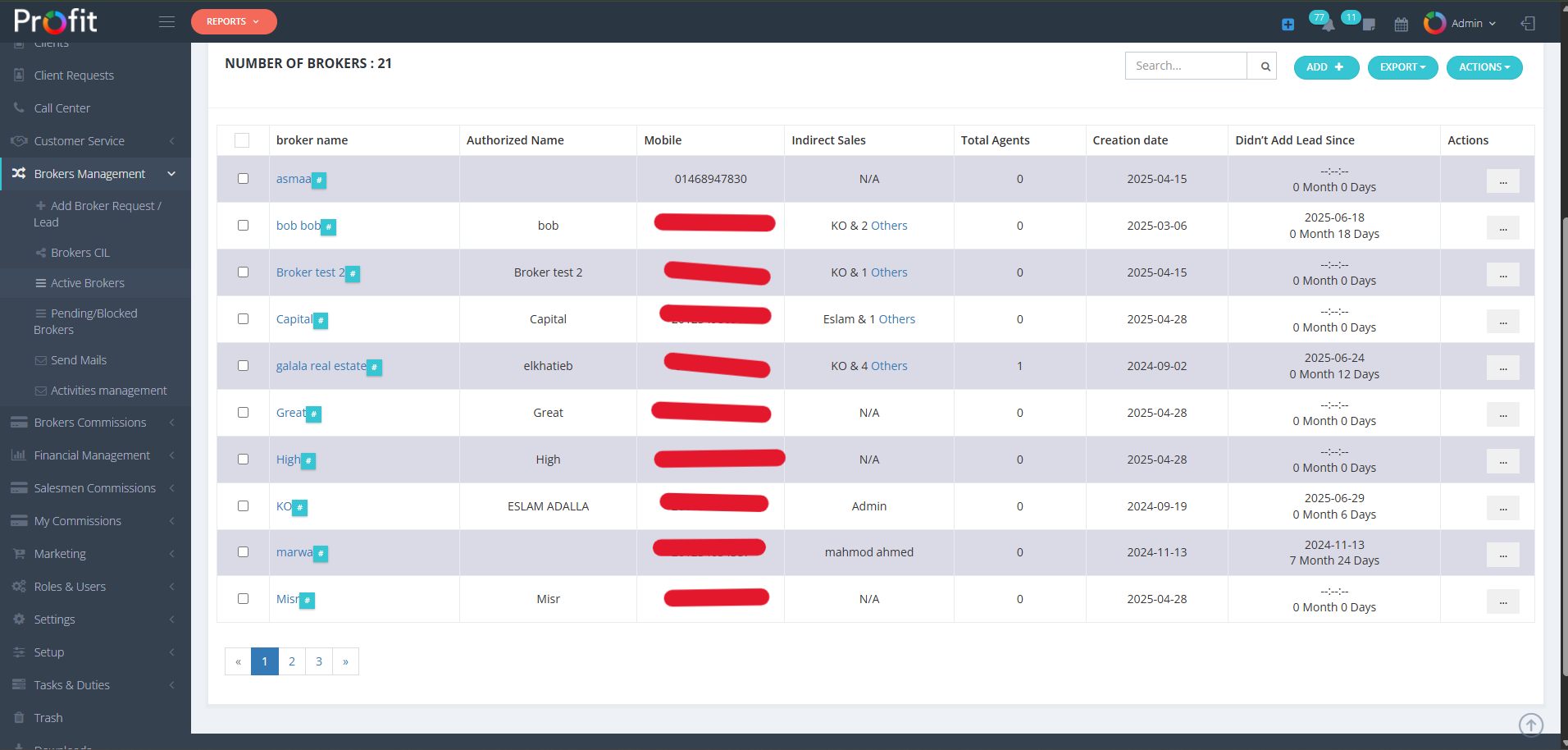
When you enter this section, you will find a comprehensive table displaying all brokers registered with your system. At the top of the table, you'll see "Number Of Brokers: XX" indicating the total count of registered brokers in your network.
عند الدخول إلى هذا القسم، ستجد جدولاً شاملاً يعرض جميع الوسطاء المسجلين في نظامك. في الجزء العلوي من الجدول، سترى "عدد الوسطاء: XX" الذي يشير إلى العدد الإجمالي للوسطاء المسجلين في شبكتك.
Click image to enlarge
انقر على الصورة لتكبيرها
Advanced Filtering System
نظام التصفية المتقدم
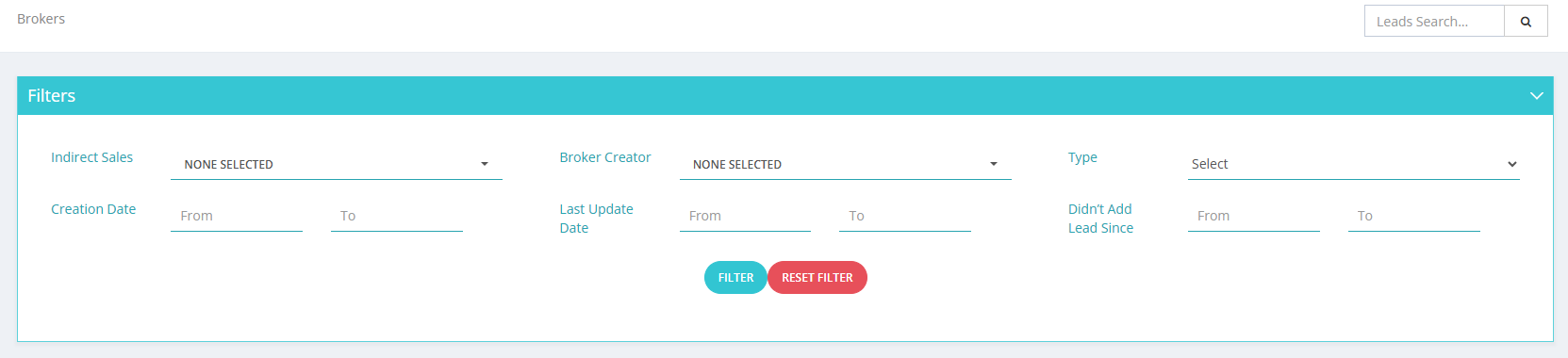
The section includes a powerful filter system that allows you to reduce the displayed brokers and has many practical applications. For example, you can filter brokers that you directly manage or specify criteria based on their activity, such as "Didn't Add Lead Since" to identify inactive brokers.
يشتمل القسم على نظام تصفية قوي يسمح لك بتقليل عدد الوسطاء المعروضين وله العديد من التطبيقات العملية. على سبيل المثال، يمكنك تصفية الوسطاء الذين تديرهم مباشرة أو تحديد معايير بناءً على نشاطهم، مثل "لم يضف عميلاً محتملاً منذ" لتحديد الوسطاء غير النشطين.
Click image to enlarge
انقر على الصورة لتكبيرها
⚠️ CRITICAL: Filter Logic Warning
This filter system uses AND logic, not OR logic. This means ALL selected filter criteria must be met simultaneously for results to appear. Be careful when combining multiple filters as this may significantly narrow your results.
This filter system uses AND logic, not OR logic. This means ALL selected filter criteria must be met simultaneously for results to appear. Be careful when combining multiple filters as this may significantly narrow your results.
⚠️ هام: تحذير منطق التصفية
يستخدم نظام التصفية هذا منطق "AND" (و)، وليس منطق "OR" (أو). هذا يعني أنه يجب استيفاء جميع معايير التصفية المحددة في نفس الوقت لتظهر النتائج. كن حذرًا عند دمج فلاتر متعددة لأن هذا قد يضيق نتائجك بشكل كبير.
يستخدم نظام التصفية هذا منطق "AND" (و)، وليس منطق "OR" (أو). هذا يعني أنه يجب استيفاء جميع معايير التصفية المحددة في نفس الوقت لتظهر النتائج. كن حذرًا عند دمج فلاتر متعددة لأن هذا قد يضيق نتائجك بشكل كبير.
Available Filter Options:
• Indirect Sales: Filter by indirect sales representatives
• Broker Creator: Filter by the person who added the broker to the system
• Type: Filter by broker type or classification
• Indirect Sales: Filter by indirect sales representatives
• Broker Creator: Filter by the person who added the broker to the system
• Type: Filter by broker type or classification
خيارات التصفية المتاحة:
• المبيعات غير المباشرة: التصفية حسب ممثلي المبيعات غير المباشرة
• منشئ الوسيط: التصفية حسب الشخص الذي أضاف الوسيط إلى النظام
• النوع: التصفية حسب نوع الوسيط أو تصنيفه
• المبيعات غير المباشرة: التصفية حسب ممثلي المبيعات غير المباشرة
• منشئ الوسيط: التصفية حسب الشخص الذي أضاف الوسيط إلى النظام
• النوع: التصفية حسب نوع الوسيط أو تصنيفه
Date Range Filters:
• Creation Date (From/To): Filter by broker registration date range
• Last Update Date (From/To): Filter by when broker information was last modified
• Didn't Add Lead Since (From/To): Filter by brokers who haven't added leads within specified timeframe
• Creation Date (From/To): Filter by broker registration date range
• Last Update Date (From/To): Filter by when broker information was last modified
• Didn't Add Lead Since (From/To): Filter by brokers who haven't added leads within specified timeframe
فلاتر النطاق الزمني:
• تاريخ الإنشاء (من/إلى): التصفية حسب نطاق تاريخ تسجيل الوسيط
• تاريخ آخر تحديث (من/إلى): التصفية حسب آخر مرة تم فيها تعديل معلومات الوسيط
• لم يضف عميلاً محتملاً منذ (من/إلى): تصفية الوسطاء الذين لم يضيفوا عملاء محتملين خلال إطار زمني محدد
• تاريخ الإنشاء (من/إلى): التصفية حسب نطاق تاريخ تسجيل الوسيط
• تاريخ آخر تحديث (من/إلى): التصفية حسب آخر مرة تم فيها تعديل معلومات الوسيط
• لم يضف عميلاً محتملاً منذ (من/إلى): تصفية الوسطاء الذين لم يضيفوا عملاء محتملين خلال إطار زمني محدد
Action Buttons
أزرار الإجراءات
ADD Button Functions:
• Add Broker: Register new broker companies to your network
• Add Broker Agent: Add individual agents to existing broker companies
• Add Broker: Register new broker companies to your network
• Add Broker Agent: Add individual agents to existing broker companies
وظائف زر الإضافة (ADD):
• إضافة وسيط: تسجيل شركات وساطة جديدة في شبكتك
• إضافة وكيل وسيط: إضافة وكلاء فرديين إلى شركات وساطة قائمة
• إضافة وسيط: تسجيل شركات وساطة جديدة في شبكتك
• إضافة وكيل وسيط: إضافة وكلاء فرديين إلى شركات وساطة قائمة
EXPORT Options:
• XLSX: Export broker data to Excel format for analysis and reporting
• CSV: Export data in comma-separated values format for database integration
• Print PDF: Generate professional PDF reports of broker information
• XLSX: Export broker data to Excel format for analysis and reporting
• CSV: Export data in comma-separated values format for database integration
• Print PDF: Generate professional PDF reports of broker information
خيارات التصدير (EXPORT):
• XLSX: تصدير بيانات الوسطاء إلى تنسيق Excel للتحليل وإعداد التقارير
• CSV: تصدير البيانات بتنسيق القيم المفصولة بفواصل لتكامل قاعدة البيانات
• طباعة PDF: إنشاء تقارير PDF احترافية لمعلومات الوسطاء
• XLSX: تصدير بيانات الوسطاء إلى تنسيق Excel للتحليل وإعداد التقارير
• CSV: تصدير البيانات بتنسيق القيم المفصولة بفواصل لتكامل قاعدة البيانات
• طباعة PDF: إنشاء تقارير PDF احترافية لمعلومات الوسطاء
ACTIONS Button: This specialized button is designed for bulk operations, allowing you to perform actions on multiple selected brokers simultaneously, providing efficient management of large broker networks.
زر الإجراءات (ACTIONS): تم تصميم هذا الزر المتخصص للعمليات المجمعة، مما يتيح لك تنفيذ إجراءات على عدة وسطاء محددين في وقت واحد، مما يوفر إدارة فعالة لشبكات الوسطاء الكبيرة.
Individual Broker Actions
إجراءات الوسيط الفردية
Each broker in the table has an individual Actions button with the following options:
لكل وسيط في الجدول زر إجراءات فردي بالخيارات التالية:
BLOCK: Suspend broker access to the system, temporarily disabling their ability to use the platform while maintaining their account information.
حظر (BLOCK): تعليق وصول الوسيط إلى النظام، وتعطيل قدرته مؤقتًا على استخدام المنصة مع الحفاظ على معلومات حسابه.
ASSIGN: Assign the broker to specific Indirect Sales representatives for better territory and relationship management.
تعيين (ASSIGN): تعيين الوسيط لممثلي مبيعات غير مباشرين محددين لتحسين إدارة المنطقة والعلاقات.
SHARE: Share broker information with Indirect Sales representatives, facilitating collaboration and information distribution.
مشاركة (SHARE): مشاركة معلومات الوسيط مع ممثلي المبيعات غير المباشرة، مما يسهل التعاون وتوزيع المعلومات.
COPY BROKER REGISTRATION URL: Generate a unique registration link for the broker. This function has extensive applications and will be explained in detail below.
نسخ رابط تسجيل الوسيط (COPY BROKER REGISTRATION URL): إنشاء رابط تسجيل فريد للوسيط. هذه الوظيفة لها تطبيقات واسعة وسيتم شرحها بالتفصيل أدناه.
⚠️ CRITICAL ACTION: RESET & SEND NEW CREDENTIALS
This function changes the broker's password and sends them new login credentials. Use this feature carefully as it will immediately invalidate the broker's current login information and send new credentials to their registered email address.
This function changes the broker's password and sends them new login credentials. Use this feature carefully as it will immediately invalidate the broker's current login information and send new credentials to their registered email address.
⚠️ إجراء حاسم: إعادة تعيين وإرسال بيانات اعتماد جديدة
تقوم هذه الوظيفة بتغيير كلمة مرور الوسيط وإرسال بيانات اعتماد تسجيل دخول جديدة إليه. استخدم هذه الميزة بعناية لأنها ستبطل فورًا معلومات تسجيل الدخول الحالية للوسيط وترسل بيانات اعتماد جديدة إلى عنوان بريده الإلكتروني المسجل.
تقوم هذه الوظيفة بتغيير كلمة مرور الوسيط وإرسال بيانات اعتماد تسجيل دخول جديدة إليه. استخدم هذه الميزة بعناية لأنها ستبطل فورًا معلومات تسجيل الدخول الحالية للوسيط وترسل بيانات اعتماد جديدة إلى عنوان بريده الإلكتروني المسجل.
DELETE: Permanently remove the broker from your system. This action should be used with extreme caution as it cannot be undone.
حذف (DELETE): إزالة الوسيط نهائيًا من نظامك. يجب استخدام هذا الإجراء بحذر شديد لأنه لا يمكن التراجع عنه.
Understanding Broker Registration URLs
فهم روابط تسجيل الوسطاء
When you click the COPY BROKER REGISTRATION URL button, the system generates a unique registration link that you send to the broker for self-registration. This automated process simplifies broker onboarding.
عند النقر فوق زر نسخ رابط تسجيل الوسيط، يقوم النظام بإنشاء رابط تسجيل فريد ترسله إلى الوسيط للتسجيل الذاتي. تبسط هذه العملية الآلية عملية تأهيل الوسطاء.
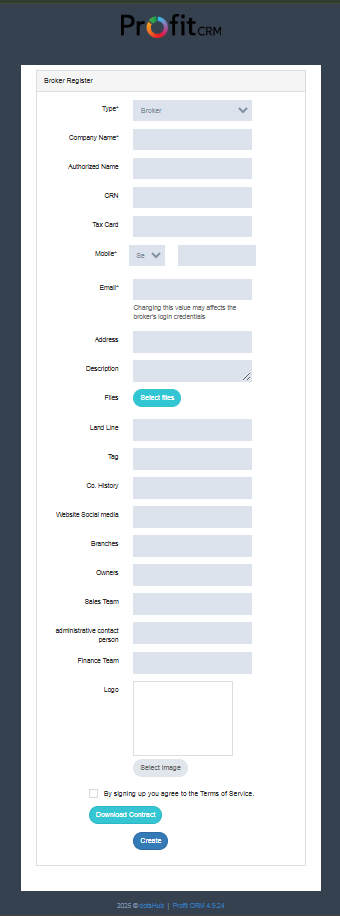
Registration Process: When the broker opens the registration link, they will see a comprehensive registration page with all required fields for completing their profile and system access setup.
عملية التسجيل: عندما يفتح الوسيط رابط التسجيل، سيرى صفحة تسجيل شاملة تحتوي على جميع الحقول المطلوبة لإكمال ملفه الشخصي وإعداد الوصول إلى النظام.
Click image to enlarge
انقر على الصورة لتكبيرها
Download Contract Feature: The registration page includes a "Download Contract" option that allows brokers to download a personalized contract with their specific information, facilitating the completion of legal procedures for registration with your company.
ميزة تنزيل العقد: تتضمن صفحة التسجيل خيار "تنزيل العقد" الذي يسمح للوسطاء بتنزيل عقد مخصص بمعلوماتهم المحددة، مما يسهل إكمال الإجراءات القانونية للتسجيل في شركتك.
Automated Onboarding: This system streamlines the broker registration process, ensuring that all necessary information is collected while providing brokers with the legal documentation they need to formalize their partnership with your development company.
التأهيل الآلي: يبسط هذا النظام عملية تسجيل الوسطاء، مما يضمن جمع جميع المعلومات الضرورية مع تزويد الوسطاء بالوثائق القانونية التي يحتاجونها لإضفاء الطابع الرسمي على شراكتهم مع شركة التطوير الخاصة بك.
Best Practices
أفضل الممارسات
1
Regular Activity Review: Use the "Didn't Add Lead Since" filter to monitor broker engagement and identify inactive accounts that may need attention.
1
مراجعة النشاط بانتظام: استخدم فلتر "لم يضف عميلاً محتملاً منذ" لمراقبة مشاركة الوسطاء وتحديد الحسابات غير النشطة التي قد تحتاج إلى اهتمام.
2
Efficient Bulk Management: Use bulk actions for managing multiple brokers simultaneously, especially for assignment and sharing operations.
2
الإدارة المجمعة الفعالة: استخدم الإجراءات المجمعة لإدارة عدة وسطاء في وقت واحد، خاصة لعمليات التعيين والمشاركة.
3
Registration Monitoring: Track broker registration completion through the URL system to ensure proper onboarding.
3
مراقبة التسجيل: تتبع اكتمال تسجيل الوسطاء من خلال نظام الرابط لضمان التأهيل المناسب.
4
Performance Analysis: Export broker data regularly for comprehensive performance analysis and strategic reporting.
4
تحليل الأداء: قم بتصدير بيانات الوسطاء بانتظام لتحليل شامل للأداء وإعداد التقارير الاستراتيجية.
⚠️ Important: Use the BLOCK function instead of DELETE to temporarily suspend underperforming brokers while preserving their account data for future reference.
⚠️ مهم: استخدم وظيفة الحظر (BLOCK) بدلاً من الحذف (DELETE) لتعليق الوسطاء ذوي الأداء الضعيف مؤقتًا مع الحفاظ على بيانات حساباتهم للرجوع إليها مستقبلاً.
System Benefits
مزايا النظام
The Active Brokers management system provides developers with comprehensive control over their broker network, ensuring efficient onboarding, performance monitoring, and relationship management while maintaining professional standards and legal compliance throughout the partnership process.
يوفر نظام إدارة الوسطاء النشطين للمطورين تحكمًا شاملاً في شبكة الوسطاء الخاصة بهم، مما يضمن كفاءة التأهيل ومراقبة الأداء وإدارة العلاقات مع الحفاظ على المعايير المهنية والامتثال القانوني طوال عملية الشراكة.